Does Ooma save its AI generated call summaries to Keap?
Yes! The Ooma Office integration with Keap does save a copy of the Call Summary to Keap as a Note. It is saved under the contact name whose phone number matches the call.
Bring your phone system and CRM together to sell more, follow up faster and grow your business.
Connect Ooma Office and Keap to get more value from every customer interaction.

Give your team the customer information they need to deliver more personal service with every call.

Keep call activity connected to customer records so valuable information is always up to date.

Connect client data and call activity so your team can turn calls into next steps and close more business.

Automate repetitive tasks so employees focus on higher-value work and make everyday workflows simpler.

Make customer interactions smoother and more consistent, no matter who answers the call.

Support more customers with connected tools so your team can work faster.
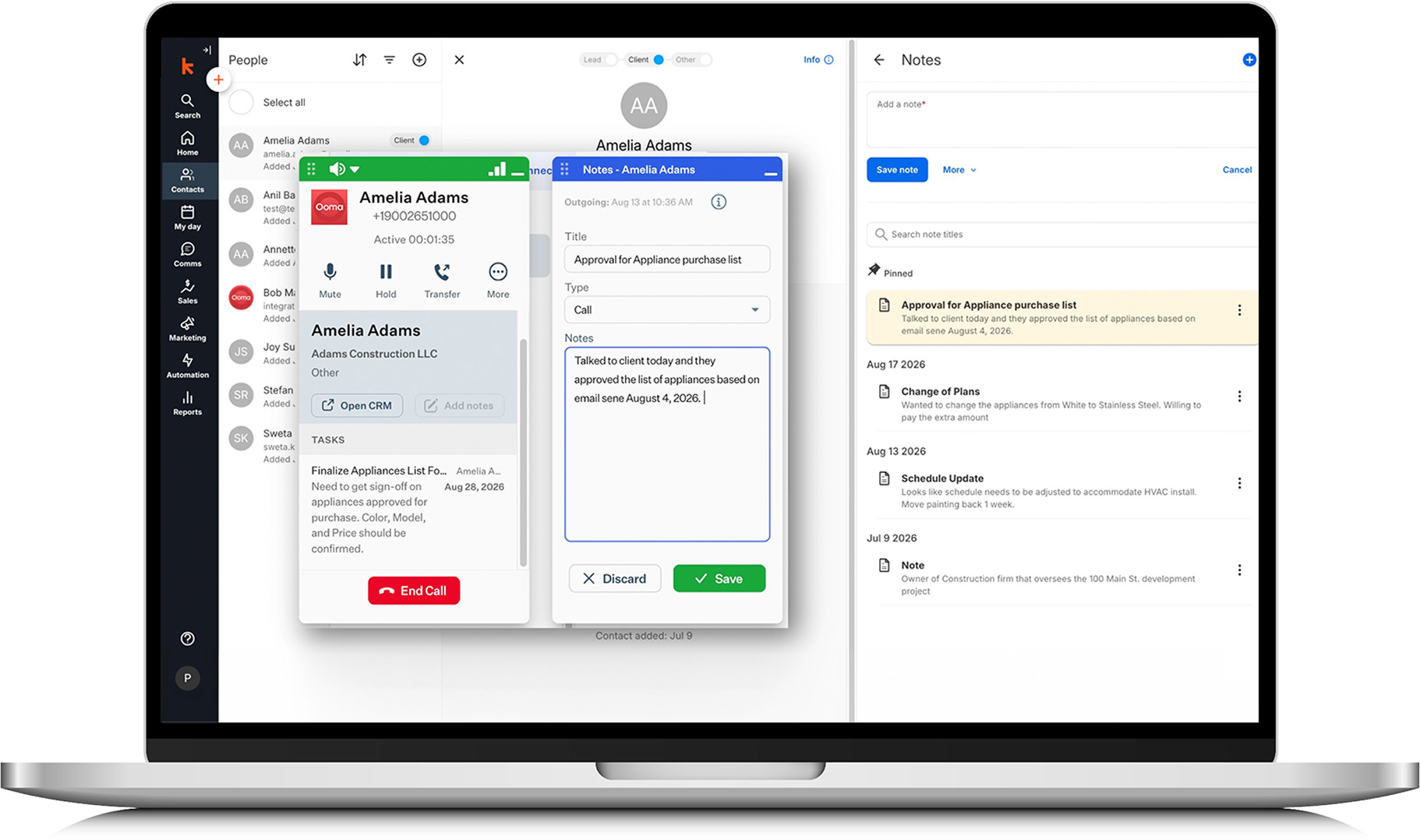
Yes! The Ooma Office integration with Keap does save a copy of the Call Summary to Keap as a Note. It is saved under the contact name whose phone number matches the call.
The integration brings Ooma Office calling and Keap customer information together, making it easier to access customer context, manage calls and keep important conversation details connected to the right contact.
Yes. When a caller’s phone number matches a contact in Keap, Ooma Office can display information from the matching contact during the call, giving you useful context without having to search for it separately.
Yes. When Ooma Office identifies a matching Keap contact, you can open that contact’s CRM record directly from the call window for quick access to additional customer information.
Yes. You can add notes with the matching Keap contact from Ooma Office, helping you capture important details while the conversation is fresh. The notes are saved in the Contact’s Notes area in Keap and can be accessed by users as part of their feed.
Yes. Ooma Office can match Keap contacts by phone number during calls, helping your team access relevant customer information as they communicate with contacts.
If Ooma Office cannot find a Keap contact with a matching phone number, it will not be able to associate the call with an existing Keap contact record. You can however, create a contact in Ooma Office from the caller ID pop, and it will save as a new contact in Keap.
The integration is especially useful for sales, service and other customer-facing teams that use Keap to manage customer relationships. It helps employees spend less time switching between systems while keeping customer conversations and CRM information connected.


















Connect your business phone system to the apps you already use every day and cut down on after-call work. […]

AT&T has started phasing out copper POTS lines, with no new installs or changes in nearly 20 states beginning October 15, 2025—and most copper services slated to retire by 2029. That puts fire alarms, elevator phones, safety call boxes and other POTS-dependent devices at risk. Learn the timeline, the operational and compliance impacts, and how modern POTS replacement solutions like AirDial keep critical systems online. […]

Endless phone menus, hold times and voicemail leave callers frustrated. Here are eight ways AI is changing how businesses answer the phone, and how to balance automation with a human touch. […]

See how call volume, timing, duration, answer rates and transfers can reveal ways to improve business operations. […]