30 Safety features every senior should know
 | January 8, 2026 | 9 min read |
Retirement is the stage of life when we can finally focus on our families, hobbies and other activities that we might have put aside during our busy working years. While this time can be fulfilling and meaningful, many seniors face new challenges due to rapid advances in communication technology, which can undermine that peace. In addition to the expected physical health changes, seniors must now also worry about issues like elder fraud, navigating new devices and a greater reliance on digital tools for tasks that once involved face-to-face interaction. Families and caregivers try their best to help, but it can often feel like the very tools meant to make life easier only add to the confusion.
To clarify some increasingly complex technologies, Ooma is highlighting 30 safety tools that can support seniors at home and online.
Digital safety and senior internet scam protection
Elder fraud has been increasing for years, especially in online environments, making digital safety crucial for those ages 60 and older. One of the most effective defenses against such fraud is the use of strong passwords. Research consistently shows that using long, unique passwords for each account significantly reduces the risk of unauthorized access. However, this security measure has a downside: These complex passwords can be nearly impossible to remember. For this reason, password managers are invaluable for people of all ages. They securely store all login information and can automatically generate new, highly secure passwords.
In a similar vein, multi-factor authentication should be enabled whenever possible. This feature significantly reduces unauthorized logins by requiring a second step, typically a text message or other authentication method, like a passkey, before granting account access.
Protection from physical harm
As we age, our bodies begin to respond to physical trauma differently, and things like minor falls or injuries can more easily turn into complex medical emergencies. For this reason, it’s a good idea to be aware of the 911 safety features for seniors that make it easy to get help in an emergency. For example, North America has a system known as Address-Based 911, or Enhanced 911 (E911), that sends a precise home address to emergency dispatchers even when a caller cannot speak clearly.
Another feature you should be aware of is Medical ID, which is available on smartphones. This tool can prevent delays in medical treatment by displaying important health information directly on your phone’s lock screen, including relevant medical conditions, allergies and medications.
Finally, fall detection devices can be a great way to bridge the gap between independent living and safety for elderly individuals who are at risk. This technology is sometimes incorporated into smartwatches but is also available in standalone devices, and it can automatically detect falls and notify emergency services even when the wearer can’t respond.
Home security and personal safety
Since more than 80% of adults ages 50–80 wish to remain in their homes for as long as possible, their homes must be set up to allow them to safely age in place. In situations like these, home security systems can be a great source of comfort. Smart security cameras can be helpful for residents and families who want to check on their elderly loved ones without disrupting their daily lives. For outdoor use, motion-activated security cameras let you keep an eye on your surroundings and, when combined with geofencing technology, alert you when someone is coming or going from the property.
Similarly, smart doorbells with two-way audio let seniors talk to visitors from inside their home, reducing the pressure to open the door to unexpected strangers or delivery drivers. This can be especially useful for those with weakened immune systems who depend on things like grocery or medication deliveries.
Next, it’s worth considering installing environmental monitoring devices to track air quality, temperature changes and carbon monoxide levels, all of which can pose serious risks, especially to older adults with pre-existing conditions. Together, these home safety tools promote independence while reducing exposure to hidden dangers.
Accessibility and cognitive well-being
Certain daily tasks can become more challenging with age, especially for those with vision and hearing changes or early cognitive decline. These days, many caregiver monitoring tools and medical alert phone features can help people keep track of important things. For example, medication monitoring apps send reminders for scheduled doses and upcoming appointments, which can be a great help, as missed medications are among the most common risks for seniors living independently.
Another useful smartphone feature to look into for anyone with hearing or visual impairment is visual and hearing call alerts, which amplify incoming calls with flashing lights or louder ringtones so important calls aren’t missed. Additionally, your phone usually offers options for simplified handset interfaces, which make buttons larger and can simplify messy or complicated screens. These features reduce frustration and support seniors who find certain phone features confusing, incompatible or cumbersome.
Senior phone safety and scam prevention
Phone scam threats are increasing across the entire population, particularly for seniors, making phone safety features vital. STIR/SHAKEN caller ID authentication is a great idea for seniors, as it helps filter out spoofed numbers and spam calls, reducing the number of fraudulent calls that target older adults. Additionally, advanced call blocking features can go even further by restricting calls to known contacts only.
Finally, VoIP for seniors is becoming increasingly popular for those who want the audio quality, reliability and safety of a landline without the hassle of a traditional phone plan.
No matter which emergency features for seniors fit your needs and lifestyle, Ooma is ready to help you build a more secure and comfortable communication experience. From home phone services to home security solutions, we support seniors with clarity and reliability, enabling stronger, smarter and more dependable communication in their day-to-day lives.
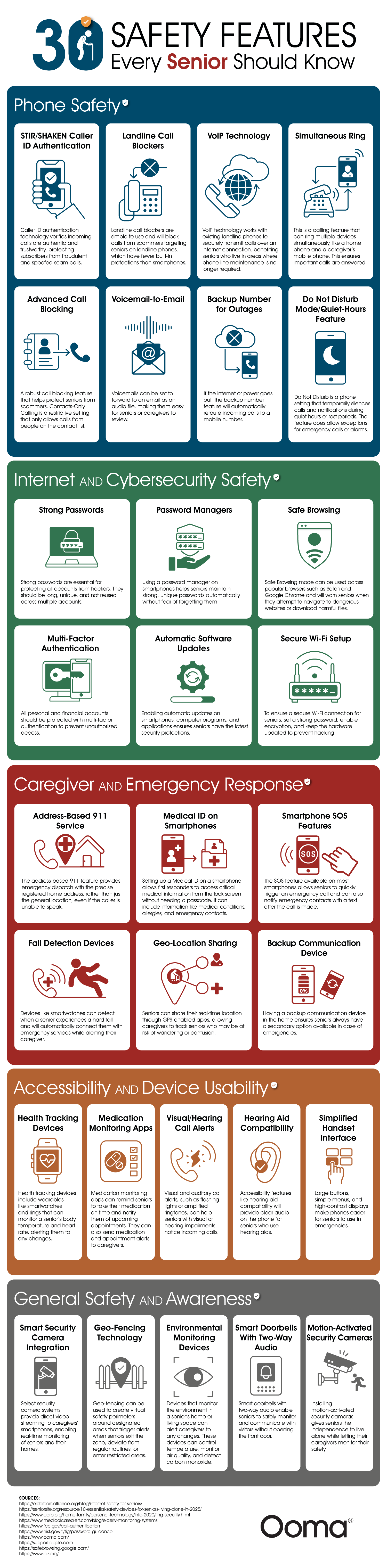
30 home and phone safety features for seniors
| Category | Safety Feature | Description |
|---|---|---|
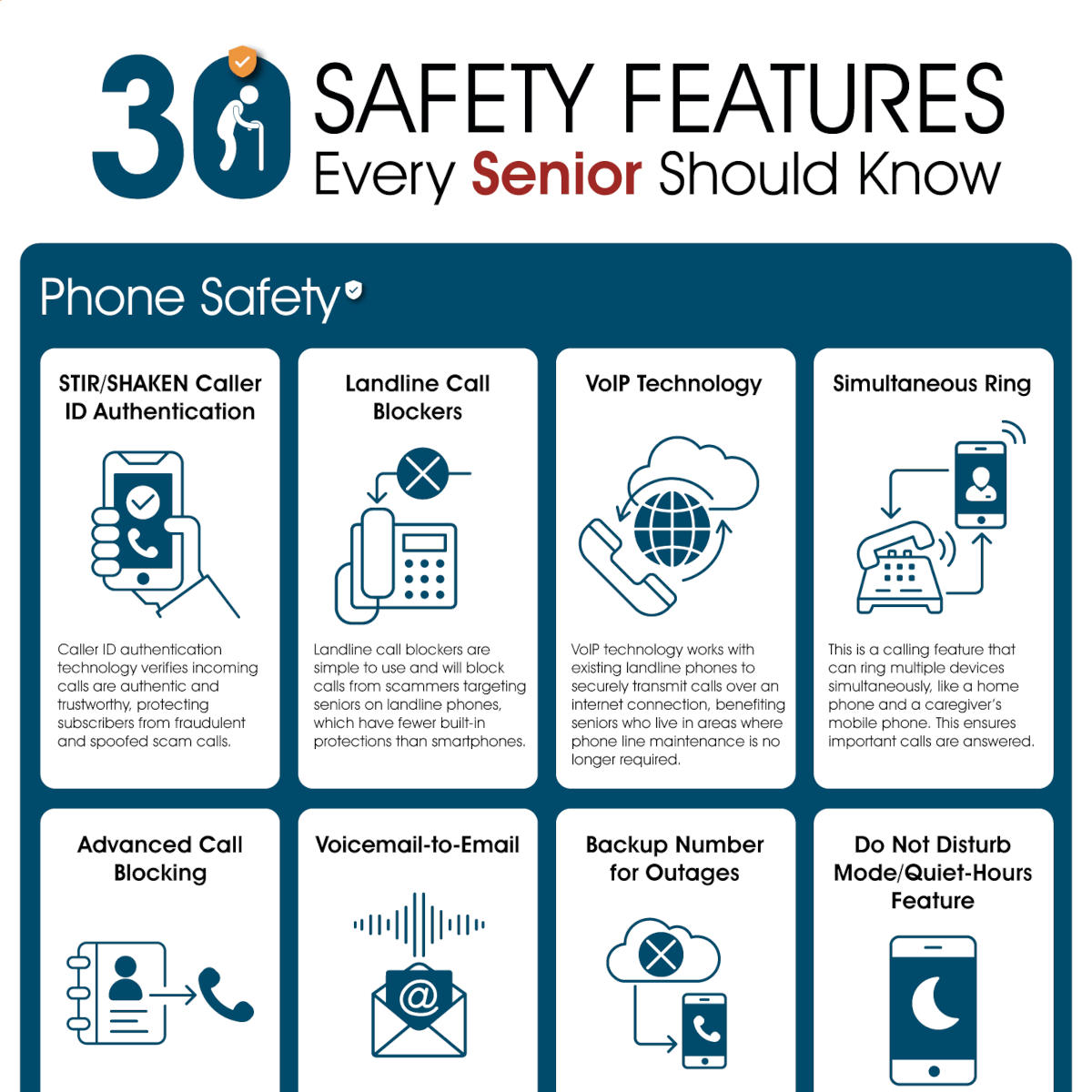
| Phone Safety | STIR/SHAKEN Caller ID Authentication | Caller ID authentication technology verifies incoming calls are authentic and trustworthy, protecting subscribers from fraudulent and spoofed scam calls. |
| Phone Safety | Landline Call Blockers | Landline call blockers are simple to use and will block calls from scammers targeting seniors on landline phones, which have fewer built-in protections than smartphones. |
| Phone Safety | VoIP Technology | VoIP technology works with existing landline phones to securely transmit calls over an internet connection, benefiting seniors who live in areas where phone line maintenance is no longer required. |
| Phone Safety | Simultaneous Ring | This is a calling feature that can ring multiple devices simultaneously, like a home phone and a caregiver’s mobile phone. This ensures important calls are answered. |
| Phone Safety | Advanced Call Blocking | A robust call blocking feature that helps protect seniors from scammers. Contacts-Only Calling is a restrictive setting that only allows calls from people on the contact list. |
| Phone Safety | Voicemail-to-Email | Voicemails can be set to forward to an email as an audio file, making them easy for seniors or caregivers to review. |
| Phone Safety | Backup Number for Outages | If the internet or power goes out, the backup number feature will automatically reroute incoming calls to a mobile number. |
| Phone Safety | Do Not Disturb Mode/Quiet-Hours Feature | Do Not Disturb is a phone setting that temporarily silences calls and notifications during quiet hours or rest periods. The feature does allow exceptions for emergency calls or alarms. |
| Internet and Cybersecurity Safety | Strong Passwords | Strong passwords are essential for protecting all accounts from hackers. They should be long, unique and not reused across multiple accounts. |
| Internet and Cybersecurity Safety | Password Managers | Using a password manager on smartphones helps seniors maintain strong, unique passwords automatically without fear of forgetting them. |
| Internet and Cybersecurity Safety | Safe Browsing | Safe Browsing mode can be used across popular browsers such as Safari and Google Chrome and will warn seniors when they attempt to navigate to dangerous websites or download harmful files. |
| Internet and Cybersecurity Safety | Multi-Factor Authentication | All personal and financial accounts should be protected with multi-factor authentication to prevent unauthorized access. |
| Internet and Cybersecurity Safety | Automatic Software Updates | Enabling automatic updates on smartphones, computer programs and applications makes sure that seniors have the latest security protections. |
| Internet and Cybersecurity Safety | Secure Wi-Fi Setup | To ensure a secure Wi-Fi connection for seniors, set a strong password, turn on encryption and keep the hardware updated to prevent hacking. |
| Caregiver and Emergency Response | Address-Based 911 Service | The address-based 911 feature provides emergency dispatch with the precise registered home address, rather than just the general location, even if the caller is unable to speak. |
| Caregiver and Emergency Response | Medical ID on Smartphones | Setting up a Medical ID on a smartphone allows first responders to access critical medical information from the lock screen without needing a passcode. It can include information like medical conditions, allergies and emergency contacts. |
| Caregiver and Emergency Response | Smartphone SOS Features | The SOS feature available on most smartphones allows seniors to quickly trigger an emergency call and can also notify emergency contacts with a text after the call is made. |
| Caregiver and Emergency Response | Fall Detection Devices | Devices like smartwatches can detect when a senior experiences a hard fall and will automatically connect them with emergency services while alerting their caregiver. |
| Caregiver and Emergency Response | GeoLocation Sharing | Seniors can share their real-time location through GPS-enabled apps, allowing caregivers to track seniors who may be at risk of wandering or confusion. |
| Caregiver and Emergency Response | Backup Communication Device | Having a backup communication device in the home ensures seniors always have a secondary option available in case of emergencies. |
| Accessibility and Device Usability | Health Tracking Devices | Health tracking devices include wearables like smartwatches and rings that can monitor a senior’s body temperature and heart rate, alerting them to any changes. |
| Accessibility and Device Usability | Medication Monitoring Apps | Medication monitoring apps can remind seniors to take their medication on time and notify them of upcoming appointments. They can also send medication and appointment alerts to caregivers. |
| Accessibility and Device Usability | Visual/Hearing Call Alerts | Visual and auditory call alerts, such as flashing lights or amplified ringtones, can help seniors with visual or hearing impairments notice incoming calls. |
| Accessibility and Device Usability | Hearing Aid Compatibility | Accessibility features like hearing aid compatibility will provide clear audio on the phone for seniors who use hearing aids. |
| Accessibility and Device Usability | Simplified Handset Interface | Large buttons, simple menus, and high-contrast displays make phones easier for seniors to use in emergencies. |
| General Safety and Awareness | Smart Security Camera Integration | Select security camera systems provide direct video streaming to caregivers’ smartphones, enabling real-time monitoring of seniors and their homes. |
| General Safety and Awareness | GeoFencing Technology | Geofencing can be used to create virtual safety perimeters around designated areas that trigger alerts when seniors exit the zone, deviate from regular routines or enter restricted areas. |
| General Safety and Awareness | Environmental Monitoring Devices | Devices that monitor the environment in a senior’s home or living space can alert caregivers to any changes. These devices can control temperature, monitor air quality and detect carbon monoxide. |
| General Safety and Awareness | Smart Doorbells With Two-Way Audio | Smart doorbells with two-way audio enable seniors to safely monitor and communicate with visitors without opening the front door. |
| General Safety and Awareness | Motion-Activated Security Cameras | Installing motion-activated security cameras gives seniors the independence to live alone while letting their caregivers monitor their safety. |