



Thank you

Thank you!

An Ooma Office Sales Representative will be in touch shortly.

If you do not receive the call within a few minutes, please call: 877-353-5185

Popup images - person doing consultation

Let’s talk!

Our team can help you find the right solution.

Ooma AI is purpose-built for growing businesses. LEARN MORE
LIVE CHAT
All systems are 100% operational.
Chat support

Thanks — We’ve Got Your Request.

A member of our support team will reach out to you as soon as we’re back online. In the meantime, you can keep browsing our support articles.

Need an answer right now?

Most questions are already answered in our support articles — setup guides, troubleshooting and how-tos.

Visit the Support Site
Or leave a message and we’ll follow up
By clicking below you expressly agree to and acknowledge the statements set forth in this
link By submitting your contact information, you are giving express written consent to receive on your telephone, mobile or other electronic device auto-dialed, pre-recorded, artificial or other automated telemarketing calls or texts (SMS & MMS) from Ooma, its marketing partners, or third parties acting on Ooma’s behalf, even if your number is a on a corporate, state or federal Do Not Call (DNC) list. Carrier fees may apply. Consent is not a condition of purchase. It also indicates that you agree to Ooma’s Privacy Policy.
and in the Ooma Rewards Program Terms and Conditions.
Fix error

Connecting devices to the Ooma Connect Base Station

Last Updated: March 2, 2026

You can connect almost any Internet-enabled device to the Ooma Connect Base Station! If you have multiple devices to connect, please see this article to determine whether you need to purchase a new router to get started.

Begin by connecting your router or switch to the LAN port on the Base Station, as shown below:
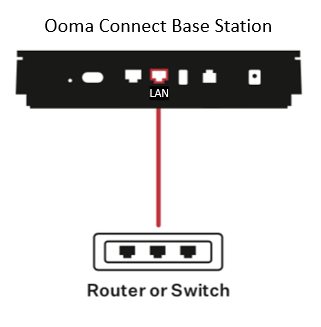
router or switch

You can now use the router or switch to connect a wireless access point or to directly connect any Internet-capable device. The Connect Base Station can also support one analog telephone or telephony device like a fax machine. Just connect the device to the PHONE port on the back of the Connect Base Station:
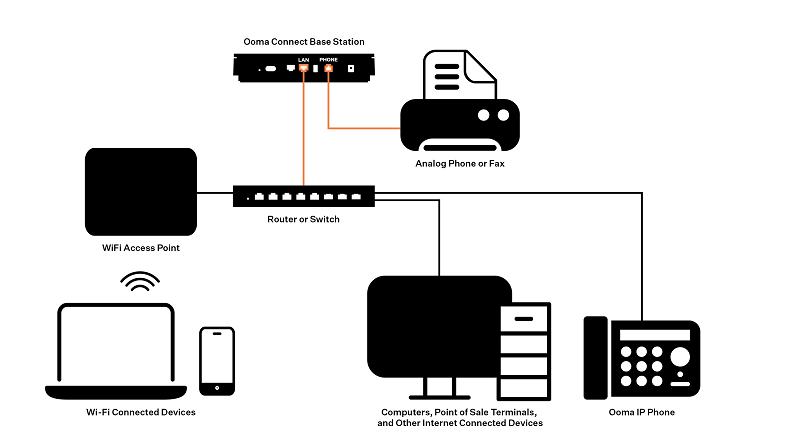
full

If you have more than one analog device to connect, you can sync up to four Ooma Linx devices with the Connect Base Station to expand your setup.

An example of a complete setup might look something like this:
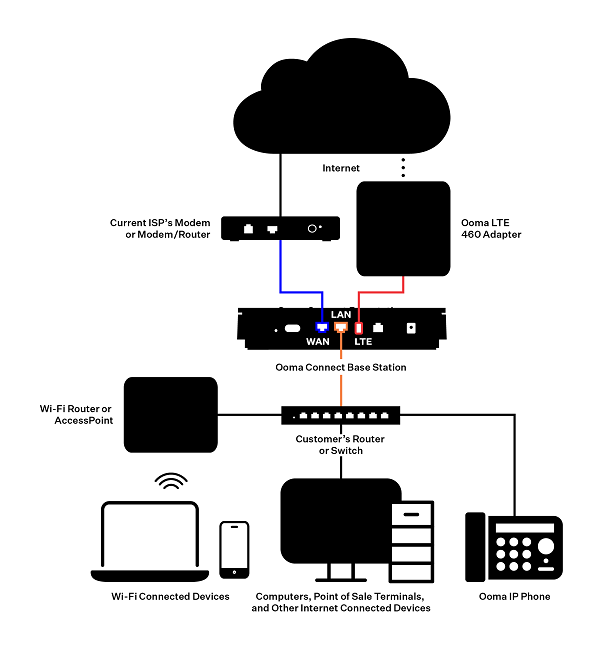
complete