



Thank you

Thank you!

An Ooma Office Sales Representative will be in touch shortly.

If you do not receive the call within a few minutes, please call: 877-353-5185

Popup images - person doing consultation

Let’s talk!

Our team can help you find the right solution.

Ooma AI is purpose-built for growing businesses. LEARN MORE
All systems are 100% operational.

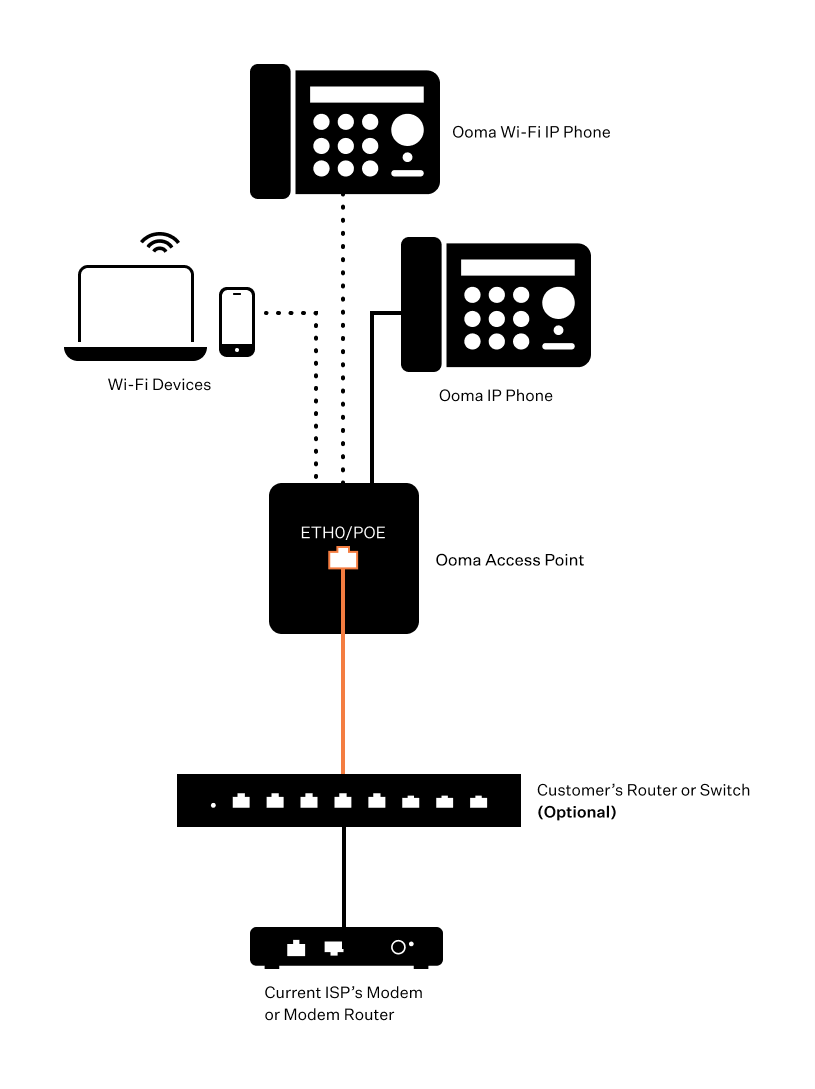
How to configure your existing Internet connection with the access point and an optional router or switch

Last Updated: March 8, 2026

The network schematic below outlines how you can integrate the Grandstream 7602 access point into your network. The router or switch is optional; if you are using one, you can connect it to the POE port on the access point. If you are not, you can connect your ISP’s modem or router directly to the POE port.
no_connect_optional_router